From campaign idea to ready-to-send email.
Create a one-time email or a complete sequence with AI helping you shape the message, organize the content, and move faster from brief to send.
- One-time emails or
sequences - AI-assisted copy
creation - Built into mailingboss
Start with
your campaign
goal. Let AI
shape the
message.
Create an email with AI
-
Built around your business context
Give AI your brand, business focus, audience, offer, and campaign purpose so the first draft begins with direction.
-
One email or a connected sequence
Create a focused broadcast for a specific moment or map a recurring series for onboarding, nurturing, updates, or promotion.
-
From copy to campaign workflow
Choose a template, refine the email, configure settings, select recipients, and schedule the send inside MailingBoss.


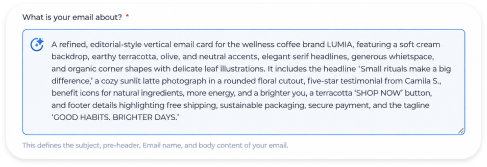
Give the email a purpose before giving it a prompt.
Start with your audience, offer, and the action you want readers to take. Add your business context and preferred language so AI has a clear direction for your first draft.
- Subject, preheader, email name, and body content shaped together
- Business-focus options that guide the message
- Language, sender, list, and timing included in the workflow
From question to action in three steps.

Choose the campaign type
Create a one-time email for a specific send or build a sequence for recurring communication.
Describe your goal
Tell AI about your brand, audience, offer, and the action you want readers to take.
Refine and schedule
Edit the draft, pick recipients, and schedule the send in MailingBoss.
AI gets you started. MailingBoss carries the campaign to send.
Create a first draft with AI, then choose a template, refine the message, select your audience, and schedule your campaign in MailingBoss.
-
Template selection
Choose a starting design
-
Edit email
Refine copy and visuals
-
Email settings
Confirm campaign details
-
Recipients
Select the right audience
-
Schedule
Choose when to send
Create the email your next goal needs.
Welcome a new subscriber, introduce an offer, launch a course, or create a campaign for a client.
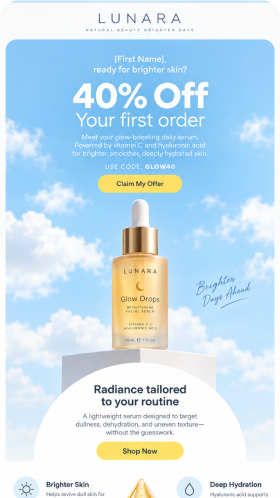
Create an email with AITurn a new offer into a reason to act now.
Introduce the product, connect it to a customer need, make the offer clear, and lead readers toward one focused action.
Make a first impression that sticks.
Thank new subscribers, set expectations for what comes next, and point them to the one step that matters most.
Build momentum before doors open.
Plan a sequence that teases the outcome, answers objections, and gives readers a clear date to enroll.
Deliver on-brand drafts faster.
Feed in the client’s brand, audience, and goal, then refine a draft they can review before it goes out.
Frequently asked
questions
Start a one-time email or a sequence, then refine the content and campaign settings in MailingBoss.
The interface collects details such as brand or website name, business focus, audience, campaign purpose, sender, language, recipient list, and send timing.
Yes. Refine the generated copy, choose a template, and edit the content and presentation before sending.
Yes. Choose your list and review recipients in MailingBoss before scheduling the campaign.
Your next email does not need to start from a blank page.
Bring the campaign goal. Let Builderall AI Email Builder help turn it into a message ready to refine and send.
Create an email with AI